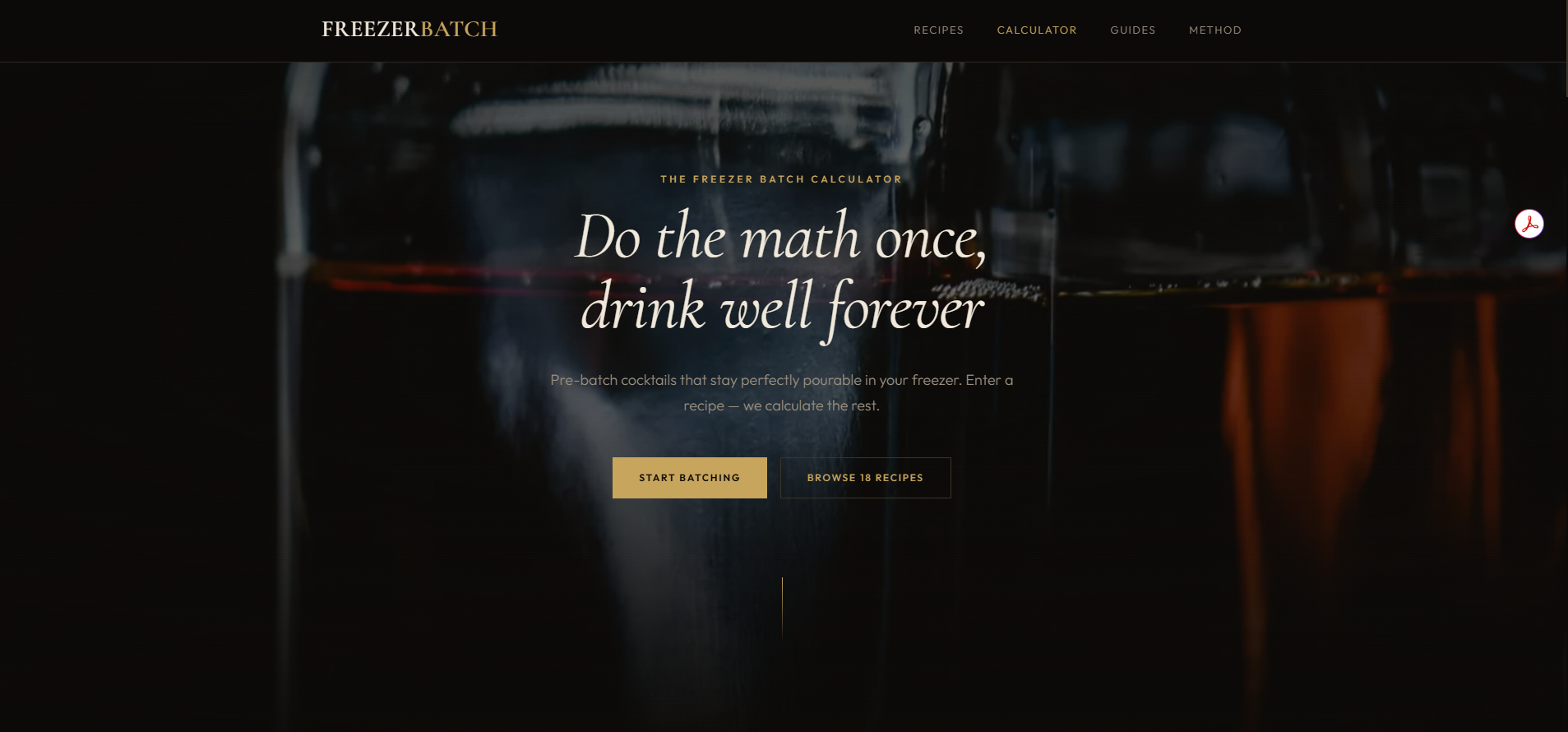
Freezer Batch Cocktails is a calculator and recipe collection for batching cocktails ahead of time and keeping them in the freezer at a pourable ABV. It covers 18 classic cocktails as presets (Negroni, Manhattan, Old Fashioned, Margarita, and others) plus a custom builder for any recipe. The user enters ingredients and a bottle size, and the calculator outputs the pour-off amount, dilution water, final ABV, and number of drinks.
The site is live at freezerbatchcocktails.com.
The site started from a real problem. My wife and I enjoy hosting, and I didn’t want to spend the evening playing bartender while everyone else relaxed. The standard answer to that problem is to pre-batch your cocktails, store them cold, and pour them straight from a bottle when guests want a drink. I researched the technique, found published batched recipes from Milk Street and others, and started using them.
The gap that turned this into a product: most of the drinks I wanted to serve didn’t have batched versions written down. Batching is a math problem (you need above 22% ABV to keep the cocktail pourable in a home freezer, and you need to add water to replicate what melted ice would normally contribute), and once I’d solved it for a few drinks, the right move was a calculator that solved it for any drink.
That framed the design: a tool for hosts who already enjoy making cocktails, not a beginner’s guide to cocktails. The audience is the version of me who wants to serve good drinks without standing behind a bar.
Designed the visual identity for upscale hosting, not cocktail-enthusiast hobbyism.
The dark palette reads as lounge, not as forum or recipe blog. The decanters in the hero photo, the deep near-black background, the spacing around the calculator, and the typography choices all serve the posture of someone setting up a bar cart for guests arriving in an hour. The cheap version of this design would have been a bright site with stock cocktail photos and ad-heavy recipe pages. I didn’t want it to look like that. The user is hosting people in their home, and the tool they’re using should match the energy of the evening they’re trying to create.
Built the calculator because the drinks I wanted to serve had no batched versions.
Most cocktail sites are recipe collections. This one started as a calculator because that’s the actual unsolved problem for someone trying to batch a non-classic cocktail. The 18 preset recipes are a useful starting point and an SEO surface, but the calculator is what the site exists for. A user can enter any recipe for one drink and get back the bottle math for batching it: the pour-off amount (how much spirit to remove from the bottle to make room for the other ingredients), the dilution water amount, the final ABV, and the number of drinks the bottle will yield.
The “Custom” tab is the actual product. The presets are the marketing for it.
Made every input drive the output in real-time so the math feels invisible.
There is no “calculate” button. As soon as a user picks a recipe, changes a bottle size, or adjusts the dilution, the outputs update. The interaction model is closer to a spreadsheet than to a form. That decision is small but important: batching math is intimidating to people who haven’t done it, and a “submit” button frames it as a calculation step. Real-time updates frame it as exploration. A user can wiggle the inputs and watch how each one affects the final ABV, which builds intuition faster than reading an explainer would.
The ABV cheatsheet below the calculator is part of the same idea: keep the numbers visible while the user is making choices, so the science feels like context, not homework.
Used the same preset-to-custom pattern as the dough sites.
This pattern shows up across my work because it works. A new user lands on the page, picks a preset (Negroni, Manhattan, Margarita), and gets a working batch recipe with no upfront knowledge required. A user who’s batched before opens the Custom tab and enters their own ingredients. The two modes share the same calculator backbone, the same output display, and the same export options.
Carrying this pattern across products is part of what makes them feel like work from the same designer, not work from the same template.
Gave the recipe multiple exit paths because the bottle math leaves the screen.
Copy, share, print, email-me-the-recipe. Four export options is more than most sites offer for a calculator output. Each one maps to a moment in the hosting flow. Copy is for pasting into a note or a text message. Share is for sending the recipe to a co-host. Print is for taping next to the bar cart on the night you’re actually pouring. Email-me is for saving it to come back to next time. Dropping any of them would have left a user reaching for an awkward workaround.
The biggest open question is how much of the calculator’s value comes from the presets versus the custom mode. Most users probably land via SEO on a preset (Negroni, Manhattan) and never touch the custom builder. The next iteration of the site will test whether nudging more users into the custom mode increases what I actually care about, which is people learning to batch any cocktail they want, not just the 18 I’ve already done the math for.
A small newsletter is in flight. The audience question (cocktail enthusiasts who host vs. host enthusiasts who like cocktails) is the same one Cottages Concierge is wrestling with from a different angle.